Activity Repository Editor
Purpose
The AristaFlow Activity Respository Editor, short ARE, introduces activities of all sorts to the system in form of activity templates.
Activity Template
In general some process steps appear in the context of different processes, like “write invoice” for example. To have maintainable models, it’s useful to have a template that implements that function and that can be used over and over again. An activity template consists of two parts. The template interface and the implementation itself.
The first one defines properties like the goal of the task, it’s description, the performing employee, execution mode (by hand/automated) or needed input/produced output to name a few. The more information you set beforehand the more explicit the activity template becomes. But you can also have a rather generic activity template that you don’t finish until you drag it onto a process step.
The implementation defines the concrete actions that are to be executed for handling the task. If you deal with an elementary activity you can call an external application or a set of system internal functions, like evaluation of a predicative condition.
An activity template can define several activities of the same work flow template. But conversely, every work flow activity is linked to exactly one template.
GUI orientation
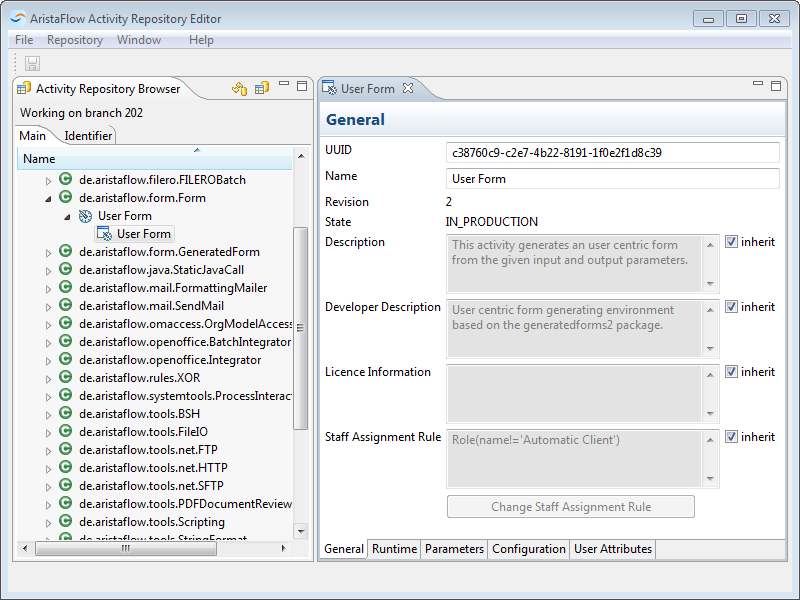
Let’s have a look at the layout of this program. On the left we have again our package explorer that lists all the available activity templates. AristaFlow already ships with a bunch of such templates for common tasks. But before we can create a template of our own we first have to create a branch and we do so by clicking on the menu entry called “Repository” -> “Create Branch” at the top bar. Then we can right click somewhere in the package explorer again to open the context menu and choose “New Executable Component Description”.
If we double click on a template in the explorer it opens information about on the bigger right side of the window. You will find general information as well as other if you click on the respective tabs on the bottom of that window.