OrgModel Editor
The OrgModel Editor creates and maintains the organizational model, which is very expressive and allows for mapping of complex company structures.
GUI orientation
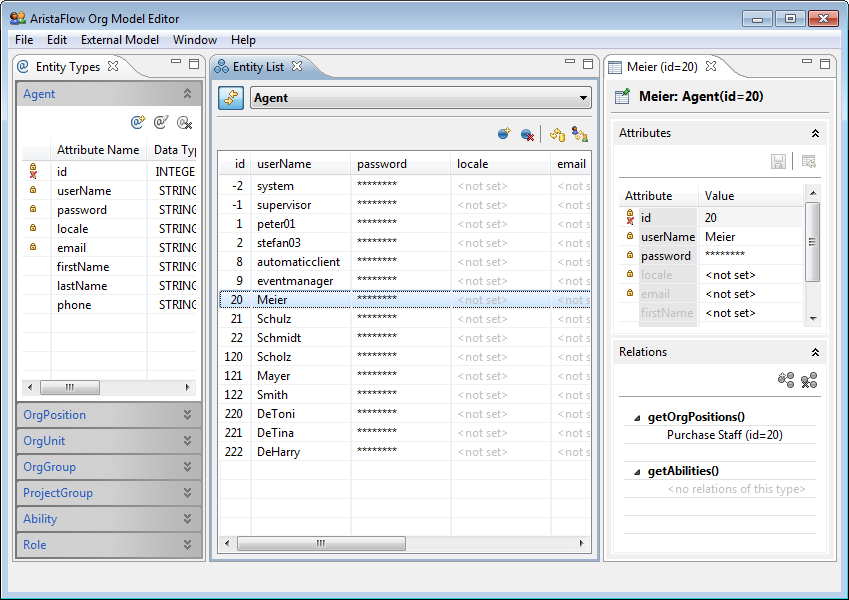
We have three columns. If you only see two, just double click on an entity in the entity list (middle column in the figure). On the left side the different entity types of the organizational model are shown. Here you can add, change and delete attributes for the entity types. You also record which attributes will be carried over by an existing LDAP. In the middle area all entities and their attributes are listed. On the top right side you can edit the attributes of the selected entity. Underneath you edit the relations to other entities, like what OrgPositions an Agent occupies within the organizational model.
Application
An organizational model will be used for mapping the process steps to the employees (really their worklists). Just apply an employee mapping rule to the process step in the PTE. In this figure you see the creation of such a rule. There are two modes. In the Assisted Policy Editing you can select single entities of different kinds, so rules are made quickly. With the Manual Policy Editing on the other side you are completely free in modelling and can use all the the attributes of an entity type and all the entity types for making a rule. This is where the above-mentioned selection rules come into play.