Process Monitor
The process monitor is for system specialists to control running process instances. Authorized users can check the current state of an activity or look into the execution history of a process instance or into the log file of the corresponding execution service. The monitor is also able to suspend / abort / reset failed activities and even whole process instances and do ad-hoc changes on a process instance.
GUI orientation
On the top right you can see the current state of a process instance, comparable to the view in a normal client. Underneath there is the execution history. It protocols all state changes of process steps, the timestamp of a change, the type of change and the user that caused the change.
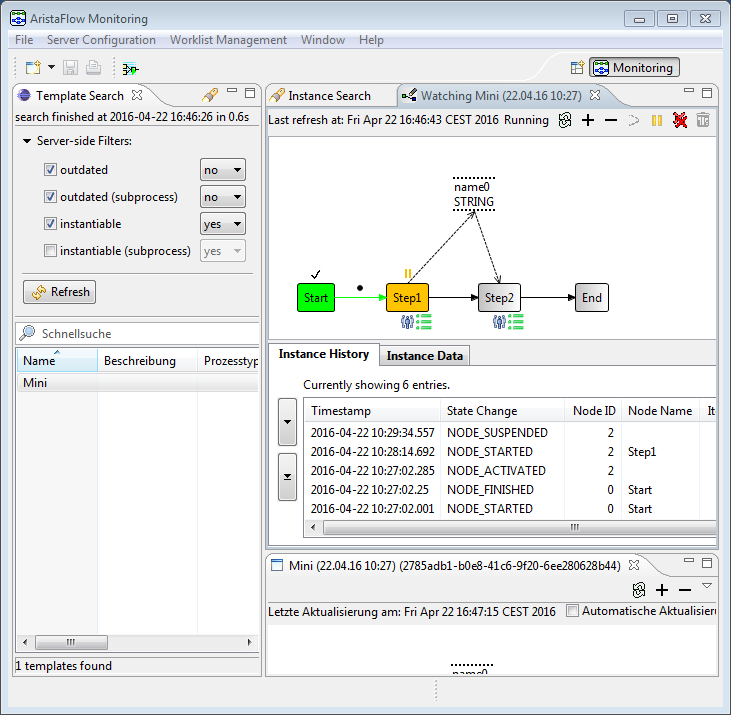
You can find a similar view in the standard client under “Done tasks”, but there you’ll only find the elements that concern the currently logged in user.
Beneath the execution history read and written data is logged in a separate data history. With some activities, like forms it is possible to re-open an already executed process step with both histories. When you do this, the written and read data will be shown directly in the respective form. An example is shown in this figure. Obviously you can’t change this data and you can only close this process step. There are no other options because the process step has already terminated and is in an end state.